



 Version
 Update Time
 Category
 Size
Size Download(3.2MB)
 1.0.0
1.0.0
 9.45KB
Enjoy millions of the latest Android apps, games, music, movies, TV, books, magazines & more. Anytime, anywhere, across your devices.
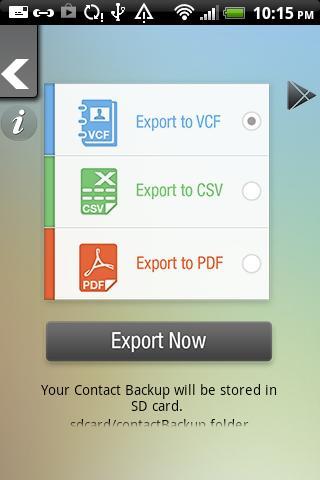
1] Export contact via pdf (all contact backup & pdf generated)
→ Export contacts via pdf; this feature allows the users to backup their contacts in a pdf-generated format by exporting them. This feature makes printing easy.
2] Export contact via V-card
→ Export contact via V-card; this feature allows the users to export their contacts and save them in a V-card [Electronic business card] file format.
3] Export contact via CSV
→ Export contacts via CSV, this feature exports all your contacts and saves them in comma-separated values.
4] Monthly Backup Notifications
→ This is a very essential feature, which helps to keep the contact backup up-to-date, the users receive a notification on monthly basis to update their backup.

 Users also viewed
See all
Users also viewed
See all
updated
updated
updated

updated
updated

updated

updated

updated

updated

updated
updated

updated
 Popular Games
See all
Popular Games
See all
updated

updated

updated

updated

updated

updated

updated
updated

updated

updated

updated

updated